
Case study · Free & open-source desktop tool · 02 / 04
Whence
Every live AI work surface, at a glance.
Whence is a small, adjustable, HUD of your local AI work (Claude/GPT sessions, browser chats, local models, terminals) grouped by project: what's active, what's awaiting your input, and where your focus actually sits.
It began as a small helper. Now, using it every day.

The founding problem
Focus data + lean attribution makes a complete record.
Whence began as a personal tweak to a measurement stack. NeuroSkill is an excellent tool specialized in measuring focus. The data was useful and prolific; so when trying to figure out my best flow, here were the gaps:
- One project. One focus. Multiple windows. Muddy attribution.
- OR - Multiple projects. Context switching. Bigger problem.
- Wanting to know, 'Is it done yet?' - but actual alerts kill flow.
Manual labels are accurate but interrupt the work. Activity tracking is automatic, but watching windows and scraping application titles feels invasive; and the signal is often weak.
The challenge: attribution that’s both automatic and trustworthy, without turning the tool into surveillance software or doing heavy calculations.
Selective Attribution + Insight
Interactive simulation
Twenty seconds inside the widget.
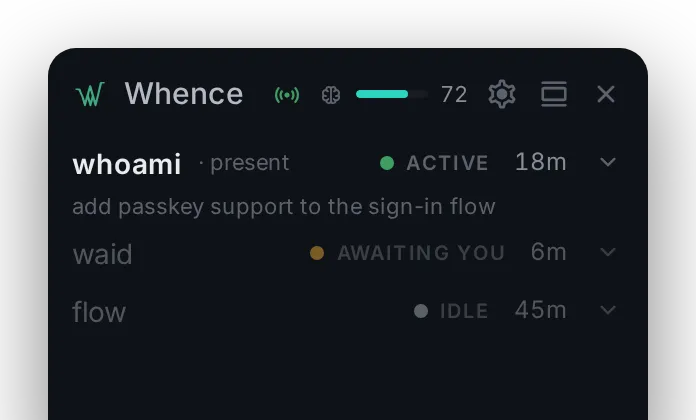
A simulation of Whence running on mock data. Selecting a project emulates focus shift. Expand a row to see its sources. Background work is displayed, but never writes to NeuroSkill's labels.
- whoami· presentActive18m
add passkey support to the sign-in flow
- claude codeActive18m
- claude webActive12m
- waidAwaiting you6m
- flowIdle45m
Timeline summary: five focus blocks today. Totals — whoami three hours eight minutes, flow one hour five minutes, waid forty-six minutes.
- whoami
- 3h08m
- flow
- 1h05m
- waid
- 46m
- 09:04–10:26 whoami main · scaffold passkey…
- 10:26–11:12 waid main · brief editor autosave
- 11:12–11:31 whoami
- 12:58–14:03 flow docs · session timer notes
- 14:20–15:47 whoami main · passkey sign-in flow
The rejected approaches
Fig. W1 — Decision record
Option 01 — Rejected
Window and application tracking
- Automatic
- Weak signal
- Privacy-hostile
Option 02 — Rejected
Manual project declaration
- Accurate
- Interruptive
- Defeats the purpose
Option 03 — Chosen
Semantic work events
- Automatic
- High-signal
- Based on actions already being taken
Whence reads your own work artifacts instead of spying on the operating system.
The insight
The work already contained its own attribution.
Prompts, repository context, session events, browser project identities, tool lifecycle changes; each already says which project it belongs to.
Whence turns those signals into one normalized stream of work events. A segmentation engine then decides: real focus change, background process, or just a brief glance.
The hard part isn't collecting events. It was deciding when a switch had actually happened—and that question made this more than an activity logger.
How Whence works
Fig. W2 — Signal flow
Stage 01
Work surfaces
- Claude Code transcripts and hooks
- Browser AI project identities
- Terminal directory context
- Ollama liveness
Stage 02
Segmentation engine
- Normalize work events
- Evaluate signal confidence
- Distinguish user action from autonomous tool activity
- Debounce project switches
- Open and close focus blocks
- Maintain live per-project state
Stage 03
Outputs
- Ambient roster widget
- Local JSONL focus timeline
- NeuroSkill project labels
- Timeline ingestion by WAID (planned)
Local-first · No accounts · No cloud · No operating-system surveillance
The hard part
A glance is not a context switch.
Opening another repository for thirty seconds should not fracture the day into another focus block. At the same time, a sustained change in activity should eventually move the attribution.
Whence uses a confidence-aware segmentation engine rather than treating every event equally.
- Direct action confirms immediately
- A prompt you submit yourself is unambiguous. Whence moves the attribution at once.
- Autonomous activity must accumulate evidence
- A tool working on its own opens a candidate period. Only sustained activity confirms the switch.
- Weak hints corroborate, never create
- A terminal directory change can support other signals, but it cannot start a focus block by itself.
- Idle time closes the block
- When the signals stop, the current block ends honestly instead of stretching to fill the silence.
A deliberate distinction
Present versus running.
whence · present
You are actively interacting with the project.
The latest signal came from a direct action, like submitting a prompt.
whence · running
The project is still doing work, but Whence cannot claim your attention.
Claude or another tool may still be working on its own after your last interaction.
That distinction keeps Whence honest about what it can and can’t infer: it attributes active work to a project without pretending it knows where your eyes are.
Product-design principles
Four commitments
Semantic, not surveillant
Whence reads project context and work events, never active-window titles or operating-system usage history.
Ambient, not interruptive
Every signal rides an action you were already taking. Whence doesn’t keep asking, "What are you working on?"
Diagnostic, not judgmental
Focus state and history, with no grades, guilt, productivity scores, or warnings about context switching.
Local and inspectable
Runs on your desktop, writes its timeline as readable JSONL, and needs no account, cloud service, or remote database.
The interface
Fig. W3 — Product surfaces



The pivot
Usage voted for the widget.
v0 through v1.5 delivered the sensor faithfully. Yet, building this right after building WAID, the next steps came naturally. Live awaiting-input status, Ollama liveness, clickable browser rows, context strings - immediately useful, building it and seeing it.
The drift was structural, not accidental. The status widget pays rent on every glance, dozens of times a day. The sensor produced write-only value: labels and timeline blocks that nothing yet read.
So the identity flipped. Whence is the status widget for local AI work; attribution is a feature. And the sensor was redirected rather than retired. Its first real consumer is WAID, the macro dashboard of my active projects.
A sensor with no consumer is indistinguishable from a no-op.
Attribution, as a feature
Two sensors answer a question neither can answer alone.
NeuroSkill measures the intensity of focus. Whence measures what that focus belongs to.
When Whence confirms a project block, it writes a narrowly scoped label to NeuroSkill—so a period of deep focus stays connected to the project it was spent on.
Deep focus for 90 minutes · Whence · segmentation engine
Whence only writes project start and end labels - never window titles, terminal history, prompt contents, or file contents.
Technical execution
A desktop product with a deliberately narrow trust boundary.
- Desktop shell
- Tauri 2
- Backend
- Rust
- Interface
- SvelteKit and Svelte 5
- Styling
- Tailwind CSS v4
- Timeline
- Local JSONL
- Desktop inputs
- File watchers and authenticated loopback receivers
- NeuroSkill integration
- Local authenticated HTTP
- Optional readback
- Read-only local SQLite
- Browser support
- First-party Manifest V3 extension
- Cloud infrastructure
- None
Architecture decisions
- The segmentation engine is pure and fixture-tested.
- Filesystem, clock and network work are isolated in an orchestrator layer.
- All local receivers require a per-install bearer token.
- Browser and terminal signals are opt-in.
- Raw window activity is explicitly out of scope.
- Downstream systems receive proposed data rather than silent permanent writes.
{"type":"block","project":"whoami","start":"09:04:11","end":"10:26:47","context":"main · scaffold passkey flow"}What shipped
From signal experiment to working product.
v0
Signal proof
- Tauri and Svelte application shell
- Claude Code transcript watcher
- Current project displayed in the widget
v1
Core product
- Confidence-aware segmentation engine
- Focus blocks and idle handling
- Present-versus-running lifecycle
- Live project roster
- NeuroSkill label writes
- Local JSONL timeline
v1.5
Product fidelity
- Real-time Claude Code hooks
- Terminal corroboration
- Ollama liveness
- Browser project extension
- Receiver authentication
- NeuroSkill connection health
- Optional focus-intensity meter
- Light and dark appearance
- Context strings and settings interface
Organic tooling and rapid iteration.
We build tools to fit our needs, and share them so that they can help others. What started as an idea to enrich another tool, bloomed into it's own entity.
And it's open-source. So we can all build better together.
"If you know from whence you came, there's no limit to where you can go."