
Case study · Free & open-source desktop tool · 01 / 04
WAID
All of your projects, one honest dashboard.
WAID — What Am I Doing? — is a local-first desktop dashboard: each project's status, live activity, and open questions in one glance, with launch buttons straight into the actual work.
One project file. One glance. No cloud.

The founding problem
A dozen active projects, one working memory.
Personal projects multiply faster than they finish.
Professional projects require care and dedication.
Every context switch (Project-management tools, inboxes, READMEs, and my own head) the same questions: "Ok, so where was I...? What's blocked? Where's the repo? Which conversation holds the plan...?"
What am I doing?
WAID is the answer to that question; built as a personal tool using team tool tactics.
The founding decision
Lightweight, secure, portable.
Each project is one plain .md file:
YAML frontmatter for metadata, a Markdown body for the brief.
Choose a folder to hold your files. Point it at an Obsidian vault; and wikilinks, backlinks, and deep links into Obsidian simply work.
The format is deliberately unowned. No proprietary schema, no export step, no lock-in: if WAID disappears, the briefs still open in any editor, because they were never anything but text.
---
name: Whence
status: active
tags: [desktop, tauri]
links:
  - label: GitHub
    url: https://github.com/…
connections:
  - id: linear-personal
    provider: linear      # token lives in the OS keyring, not here
---
What a brief can do
Fig. D2 — Product surface
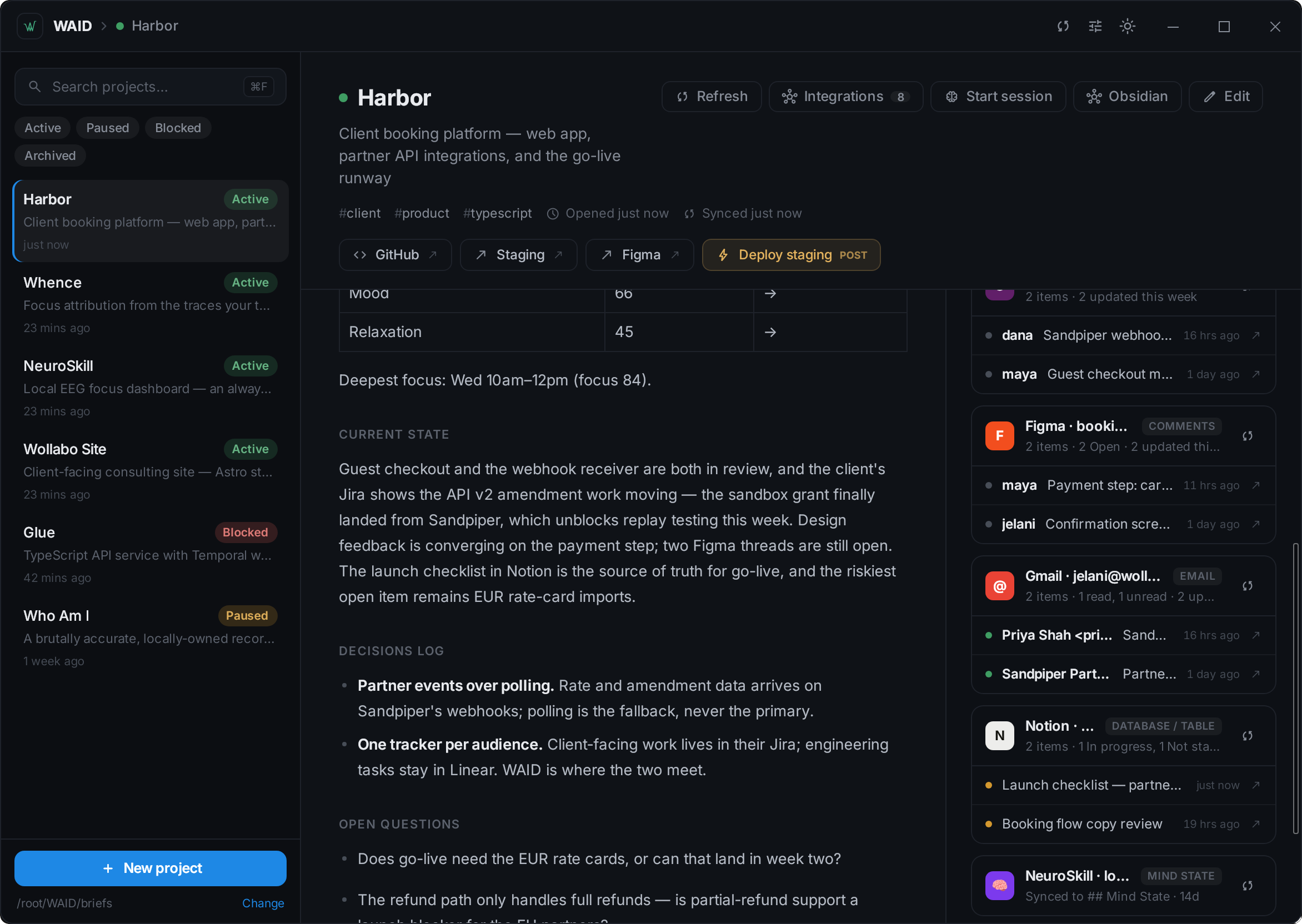
Two-pane dashboard
A sidebar of every project — name, status pill, last opened — beside a detail pane that renders the brief itself.
Launch surface
Link buttons, webhook buttons with keyring-backed secrets, and Open in Obsidian: from reading state to doing work in one click.
Quick capture
A global shortcut pops a modal, picks a project, and appends a timestamped note under its Captures heading.
Live state
Brief sync pulls open PRs, issues, CI, and releases into a managed Activity block — deterministic, no model involved.
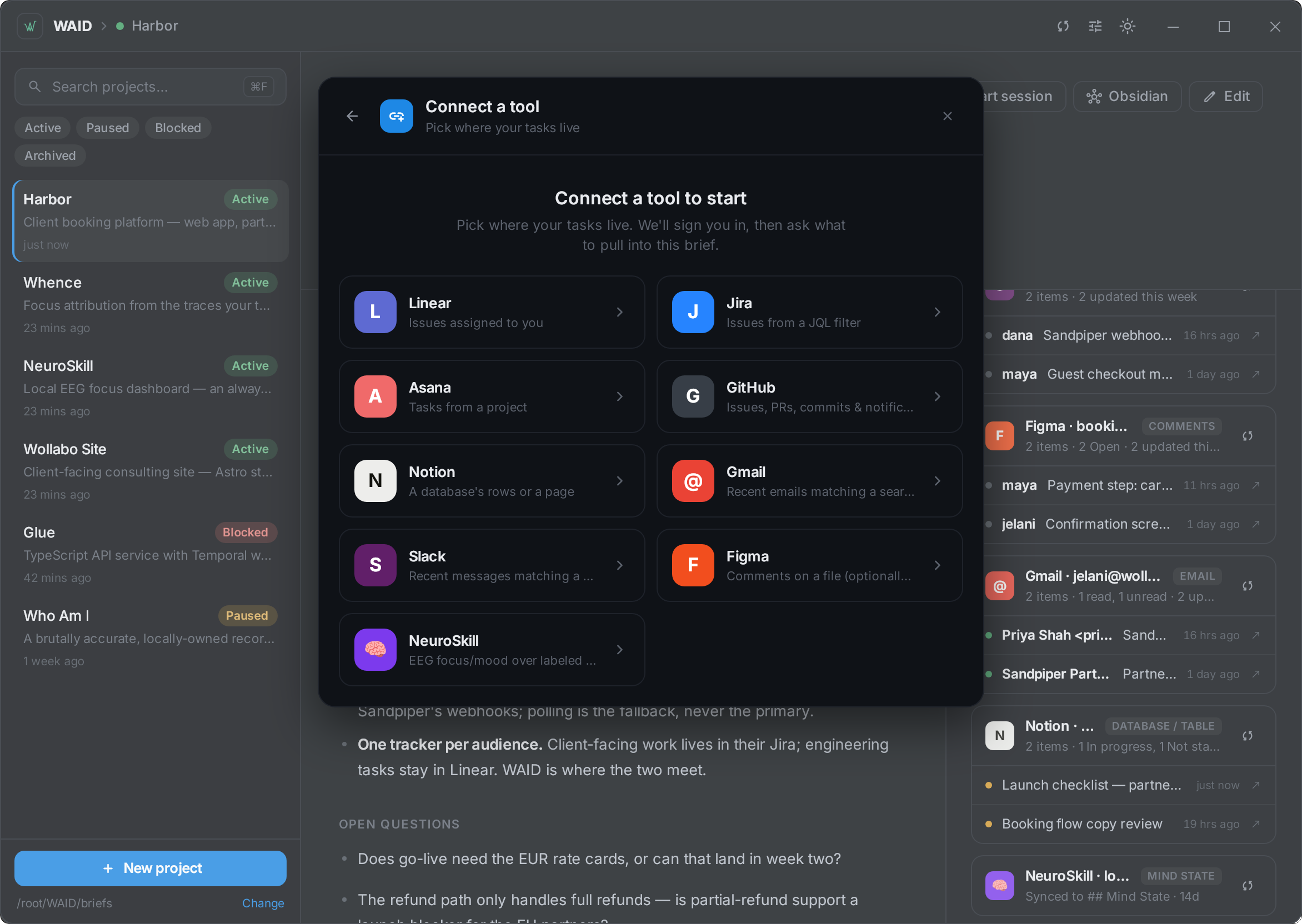
Eight connectors
Linear, Jira, Asana, GitHub, Notion, Gmail, Slack, and Figma feeds, normalized into one panel with a local rollup.
Brief bootstrap
A new project proposes its own brief — from a folder, a GitHub repo, a three-question interview, or a pasted prompt — and nothing is written until you save.
The hard part
Letting software write into files you own.
The moment sync results and model output land in your prose, portability dies and trust goes with it. WAID’s answer is app-owned regions: machine writes are confined to blocks delimited by HTML comments—markers that render to nothing, so the files stay Obsidian-native.
Everything outside the markers—your prose, your captures, your frontmatter—is preserved byte-for-byte on every write.
Fig. D3 — Who may write where
- ## Activity
- Brief sync
- Deterministic fetches only — no model ever writes here.
- ## Current State
- AI synthesis
- Regenerated wholesale inside its markers, never outside them.
- ## Open Questions
- AI synthesis
- Only the inner marked block; your own questions above it survive.
- ## Captures (and everything else)
- You
- Append-only notes; the machine reads them, never edits them.
A failed fetch is a toast, never a write. An unparseable model response leaves the file untouched.
The trust boundary
Portable metadata, keyring secrets.
Lives in the file
- Project name, status, tags
- Links and webhook shapes
- Connection metadata: provider, label, scope
- The brief itself
Lives in the OS keyring
- Integration tokens, scoped per brief
- Webhook secrets, resolved only at fire time
- OAuth grants and API keys
- Never in settings, env, or the file
The split means a brief can live in a synced Obsidian vault without ever carrying a credential—the file is safe to move; the secret never moves.
Product-design principles
Four commitments
Local-first, for real
No server, no cloud database, no account, no sync engine. A desktop app reading a folder of files on your disk.
Portable forever
Standard frontmatter and standard Markdown, Obsidian-native. If WAID disappears tomorrow, every brief still opens in any editor.
Additive, never destructive
Fetches never write into a brief; a failed integration is a toast, not a corrupted file. Machine writes stay inside marked regions.
The human owns the prose
The model regenerates only its own regions, bootstrap only proposes drafts into edit mode, and nothing reaches disk without a save.
The interface
Fig. D4 — Product surfaces




The morning briefing
Fig. D5 — Map, filter, reduce
Technical execution
Small stack, sharp edges kept deliberate.
- Desktop shell
- Tauri 2
- Backend
- Rust
- Interface
- SvelteKit and Svelte 5
- Styling
- Tailwind CSS v4
- Data
- Plain .md files on disk
- Integrations
- Plain JSON over HTTP, no provider SDKs
- Secrets
- OS keyring, scoped per brief
- LLM providers
- Ollama (local) or Anthropic, opt-in
- Cloud infrastructure
- None
Architecture decisions
- Connection metadata rides in frontmatter; tokens live only in the OS keyring.
- Frontmatter writes are surgical: one key spliced, every other byte preserved.
- Every GitHub feed must name its repos — unscoped feeds are rejected, never silently broadened.
- Gmail is read-only and metadata-only: subjects and snippets, never bodies.
- The synthesis output schema is closed to two fields — it structurally cannot touch status, links, tags, or webhooks.
- All fetched content is treated as data, never instructions.
What shipped
A personal tool that earned daily use.
Core
The dashboard
- Two-pane layout with unified titlebar
- Markdown briefs with edit mode
- Search and status filtering
- Quick capture with global shortcut
- Webhooks and launch buttons
- Obsidian vault support: wikilinks, backlinks, deep links
Live
Integrations
- Brief sync into the Activity block
- Linear, Jira, Asana, GitHub, Notion, Gmail, Slack and Figma feeds
- Per-brief keyring secrets
- NeuroSkill Mind State region
AI
The optional layer
- Current State and Open Questions synthesis
- Per-brief digest and cross-project morning briefing
- Brief bootstrap from folder, repo, interview or paste
- Plain-English query drafting for Gmail and Slack
NextPlanned
Planned
- Whence timeline ingestion (contract published)
- Drag-to-reorder projects
- Richer Markdown editor
- Due-date and overdue signals in rollups
Software that could disappear without taking anything with it.
Every design decision in WAID follows from one discipline: the app is a view; the data is yours. Files stay plain, machine writes stay marked, secrets stay in the keyring, and the model stays inside a schema it cannot escape.
The reward is a dashboard you can trust with your working memory— because on the day you stop trusting it, you lose nothing but the view.
Plain files. Marked regions. Human authority.